
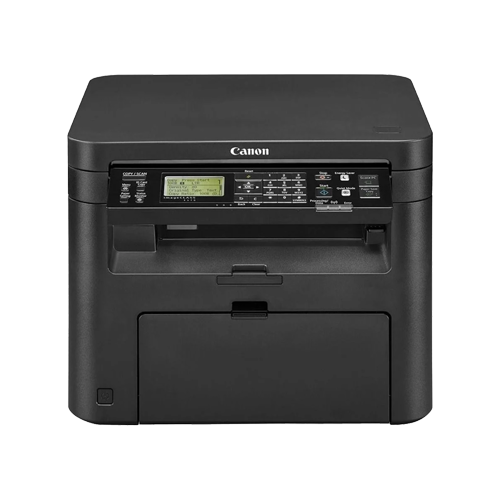

Imprimante multifonction laser monochrome sans fil Canon imageCLASS D570 – Impression, numérisation, copie, impression recto verso, impression mobile
-
Fonctionnalité multifonction 3 en 1 : Imprimer, numériser et copier
-
Impression recto verso automatique pour une utilisation efficace du papier
-
Assistance à l'impression sans fil et mobile y compris AirPrint et Mopria
-
Print speeds up to 28 pages per minute
-
User-friendly 5-line LCD display
Le Canon imageCLASS D570 is a compact and reliable monochrome laser multifunction printer designed for home offices and small businesses that require efficient printing, scanning, and copying in a single device. Combining productivity, wireless connectivity, and high-quality output, this printer offers a practical solution for everyday office document management.
Delivering print speeds of up to 28 pages per minute, the imageCLASS D570 helps users handle daily printing tasks quickly and efficiently. The printer supports automatic duplex printing, allowing users to print on both sides of the paper to reduce paper consumption and operating costs.
With built-in wireless networking, the device allows easy sharing across multiple users and devices. It also supports mobile printing solutions such as Apple AirPrint®, Mopria®, Canon PRINT Business, and Google Cloud Print, enabling convenient printing directly from smartphones and tablets.
The printer features a 250-sheet paper cassette and a 1-sheet multipurpose slot, ensuring consistent workflow with fewer paper reloads. A 35-sheet automatic document feeder (ADF) makes scanning and copying multi-page documents faster and more convenient.
Designed for simplicity and reliability, the 5-line LCD control panel provides easy navigation through printer settings and functions. With Canon’s advanced laser technology and efficient toner system, the imageCLASS D570 produces crisp text and professional-quality documents suitable for business and personal use.
Overall, the Canon imageCLASS D570 offers a balanced combination of performance, wireless connectivity, and multifunction capability, making it an excellent solution for small workgroups and home office environments.
Général
-
Type d'imprimante : Imprimante multifonction laser monochrome
-
Fonctions – Imprimer, numériser, copier
-
Technologie d'impression – Laser monochrome
-
Écran – Écran LCD 5 lignes
-
Vitesse du processeur – Non spécifiée officiellement
-
Mémoire – 512 Mo
Spécifications d'impression
-
Vitesse d'impression (noir) : jusqu'à 28 ppm
-
Délai d'impression de la première page : environ 6 secondes
-
Résolution d'impression – Jusqu'à 600 × 600 ppp (équivalent à 1200 × 1200 ppp avec amélioration de l'image)
-
Impression recto verso automatique
Copie des spécifications
-
Vitesse de copie – Jusqu'à 28 cpm
-
Résolution de copie : jusqu’à 600 × 600 dpi
-
Copier Réduire / Agrandir – 25 % à 400 %
-
Nombre maximal d'exemplaires : jusqu'à 999 exemplaires
Spécifications de numérisation
-
Type de scanner – Capteur d'image couleur à contact (CIS)
-
Résolution de numérisation optique – Jusqu'à 600 × 600 ppp
-
Résolution de numérisation interpolée – Jusqu'à 9 600 × 9 600 ppp
-
Format de numérisation maximal (ADF) : 8,5 × 14 pouces
-
Format de numérisation (à plat) maximum : 8,5 × 11,7 pouces
Chargeur automatique de documents
-
Capacité du chargeur automatique de documents (ADF) : 35 feuilles
Gestion du papier
-
Capacité d'alimentation papier standard – cassette de 250 feuilles
-
Bac multifonction – Fente d'alimentation manuelle pour 1 feuille
-
Capacité de production – 100 feuilles
Types de médias pris en charge
-
Plain paper
-
Papier épais
-
Papier bond
-
Papier étiquette
-
Enveloppe
Formats de papier pris en charge
-
Lettre
-
Légal
-
A4
-
A5
-
B5
-
Déclaration
-
Enveloppe (COM10, Monarch, DL, C5)
-
Custom Sizes
Poids du média
-
Cassette de papier – 16 à 28 lb (60 à 105 g/m²)
-
Fente d'alimentation manuelle – Liaison de 16 à 43 lb (60 à 163 g/m²)
Connectivité
-
USB 2.0 haute vitesse
-
Ethernet (10/100Base-T)
-
Wi-Fi (802.11 b/g/n)
Impression mobile
-
Apple AirPrint®
-
Service d'impression Mopria®
-
Application Canon PRINT Business
-
Google Cloud Print
Systèmes d'exploitation pris en charge
-
Windows
-
macOS
-
Linux
Cycle de service
-
Cycle d'utilisation mensuel – Jusqu'à 15 000 pages
-
Volume d'impression mensuel recommandé : 250 à 2 500 pages
Pouvoir
-
Consommation d'énergie
-
Puissance maximale – Environ 1 120 W
-
Impression – Environ 480 W
-
Consommation en veille – Environ 5,4 W
-
Mode veille – Environ 1,6 W
-
Dimensions & Weight
-
Dimensions – 15,4 × 16,8 × 12,5 pouces
-
Poids – Environ 25,2 lb (11,4 kg)
Environnement
-
Température de fonctionnement : 50 °F à 86 °F (10 °C à 30 °C)
-
Humidité de fonctionnement : 20 % à 80 % HR
ACCESSOIRES / PIÈCES DE RECHANGE :
-
Cartouche de toner noir Canon 137 (rendement d'environ 2 400 pages)
-
Câble d'imprimante USB (en option)
Produits associés
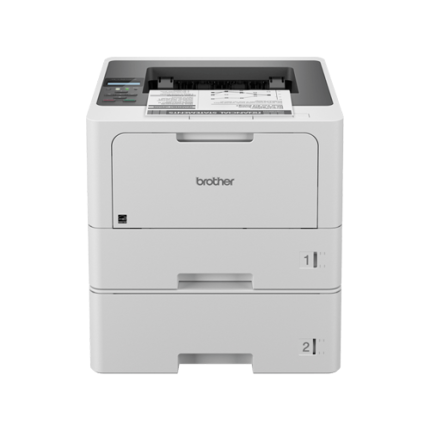
Imprimante laser monochrome sans fil Brother HL-L6210DWT – 50 ppm, impression recto verso automatique, deux bacs de 520 feuilles, Ethernet Gigabit et Wi-Fi
-
Rapide Impression monochrome jusqu'à 50 pages par minute
-
Deux bacs à papier de 520 feuilles + un bac multifonction de 100 feuilles
-
Impression recto verso automatique pour réduire la consommation de papier
-
Ethernet Gigabit et connectivité sans fil double bande
-
Advanced Triple Layer Security for device and document protection
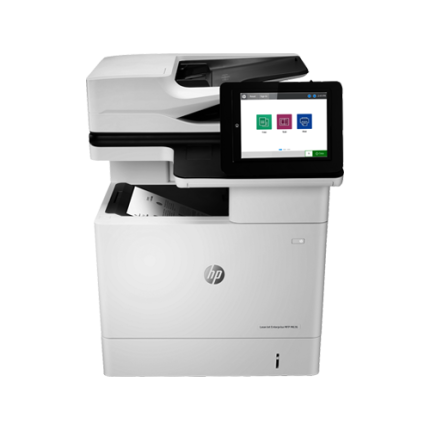
Imprimante multifonction laser monochrome HP LaserJet Enterprise M636fh – 75 ppm, impression/numérisation/copie/fax recto verso, sécurité entreprise
-
Vitesses d'impression jusqu'à 75 pages par minute
-
Fonctionnalité multifonctionnelle : Imprimer, numériser, copier et télécopier
-
Impression recto verso automatique et numérisation recto verso en un seul passage
-
Panneau de commande tactile couleur de 8 pouces
-
Advanced enterprise security with encrypted hard disk
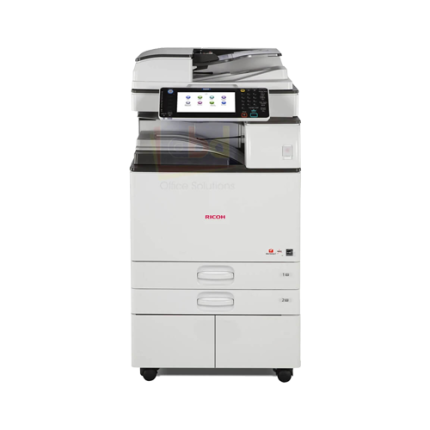
Imprimante multifonction noir et blanc Ricoh MP 3054 – Laser A3 30 ppm avec impression, copie, numérisation et fax en option
-
Fonctionnalité multifonctionnelle : Impression, copie, numérisation avec fax en option
-
Vitesse d'impression jusqu'à 30 pages par minute
-
Grand écran tactile intelligent de 10,1 pouces
-
Impression A3 avec une capacité de papier flexible et extensible
-
Fonctionnalités avancées de flux de travail avec connectivité mobile et cloud


Avis
There are no reviews yet.